
Have you ever needed to move money from Venmo to Cash App and realized there’s no direct transfer button? You’re not alone. Millions of users rely on both payment apps, but transferring funds between them can be confusing if you’re unfamiliar with the available options.
If you’re wondering how to transfer money from Venmo to Cash App, the process is possible, but it requires a workaround since the two platforms aren’t directly connected. In this guide, you’ll learn the safest and most effective ways to move funds, understand potential fees, and avoid common mistakes during the transfer process.
Can You Transfer Money Directly From Venmo to Cash App?
The short answer is no.
Venmo and Cash App are separate peer-to-peer payment platforms owned by different companies. As of now, neither service offers a built-in feature that allows direct transfers between accounts.
However, you can still move money between the two apps by using:
- A linked bank account
- A debit card
- Cash App’s banking features
- Instant transfer options (where available)
These methods are widely used and generally secure when performed correctly.
The Most Common Way: Transfer Through a Bank Account
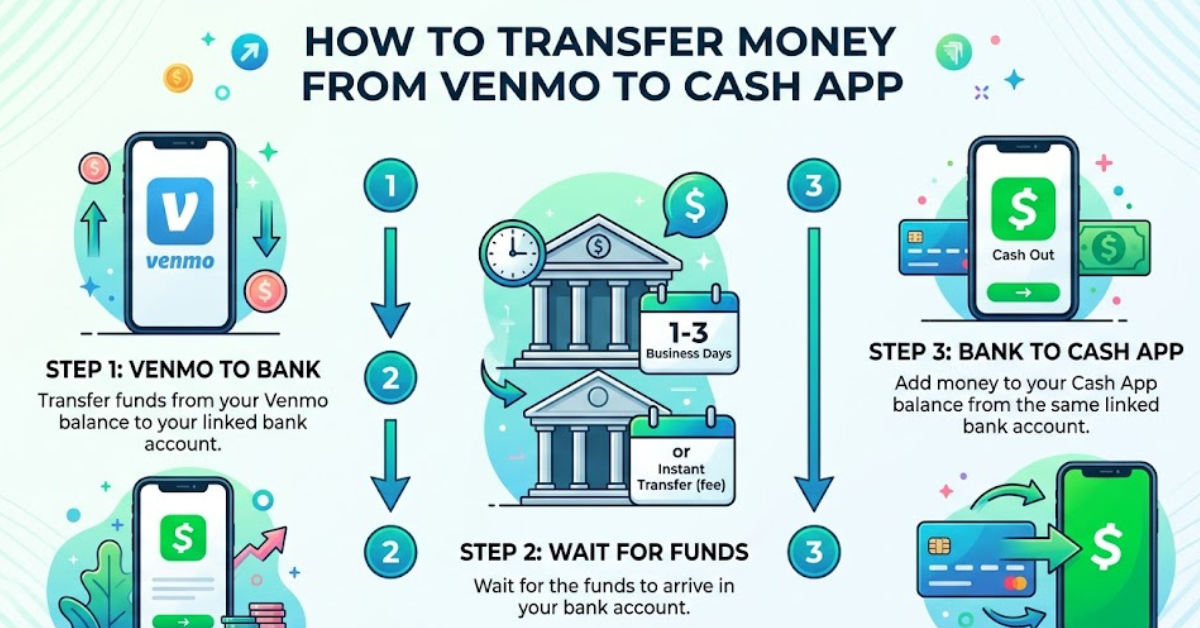
The easiest and most reliable method involves moving money from Venmo to your bank account first and then adding those funds to Cash App.
Step 1: Transfer Money From Venmo to Your Bank
- Open the Venmo app.
- Tap the Me tab.
- Select Manage Balance or Transfer to Bank.
- Enter the amount you want to transfer.
- Choose your linked bank account.
- Select either:
- Standard Transfer (typically 1–3 business days)
- Instant Transfer (usually within minutes, with a fee)
- Confirm the transfer.
Step 2: Add Money to Cash App
Once the funds arrive in your bank account:
- Open Cash App.
- Tap the Money tab.
- Select Add Cash.
- Enter the amount.
- Confirm using your linked bank account.
This method is straightforward and works for most users.
Using a Shared Debit Card to Move Funds Faster
If both Venmo and Cash App are connected to the same debit card, you may be able to streamline the process.
How It Works
- Add the same debit card to both Venmo and Cash App.
- Use Venmo’s Instant Transfer feature to send funds to the debit card.
- Access those funds through the bank account associated with the card.
- Add money to Cash App.
While this doesn’t create a true direct transfer, it can significantly reduce waiting times.
Benefits
- Faster access to funds
- Easier account management
- Fewer banking steps
Drawbacks
- Instant transfer fees may apply
- Some banks process deposits differently
Can You Use the Cash App Card With Venmo?
In certain situations, yes.
The Cash App Card functions as a Visa debit card. Some users successfully add it to Venmo as a payment method and transfer money through it.
Steps to Try
- Open Venmo.
- Go to Payment Methods.
- Add a new debit card.
- Enter your Cash App Card details.
- Verify the card if required.
If accepted, you may be able to transfer money to the Cash App Card through Venmo.
Important Note
Availability varies depending on account status, verification, and platform policies. This method may not work for every user.
How Long Does It Take to Transfer Money?
Transfer times depend on the method you choose.
| Method | Estimated Time |
| Venmo Standard Transfer | 1–3 Business Days |
| Venmo Instant Transfer | Minutes |
| Bank to Cash App | Usually Instant to 1 Day |
| Debit Card Method | Minutes to Several Hours |
If speed is important, instant transfer options are usually the fastest route.
Fees You Should Know About
Before moving funds, it’s important to understand potential charges.
Venmo Fees
Venmo may charge fees for:
- Instant transfers
- Certain business transactions
- Credit card-funded payments
Cash App Fees
Cash App may charge fees for:
- Instant deposits
- Credit card payments
- Business transactions
Cost-Saving Tip
If you’re not in a hurry, standard bank transfers are often free and can save you money.
Common Problems and How to Fix Them
Sometimes transfers don’t go as planned. Here are common issues and solutions.
Transfer Pending
Possible reasons:
- Bank processing delays
- Weekend or holiday transfers
- Security reviews
Solution: Wait 24–72 hours and check your transaction status.
Debit Card Not Accepted
Possible reasons:
- Unsupported card type
- Verification issues
- Expired card
Solution: Update your card information and verify your identity.
Transfer Failed
Possible reasons:
- Insufficient balance
- Incorrect banking details
- Temporary app restrictions
Solution: Double-check account information and retry later.
Security Tips When Moving Money Between Apps
Digital payment apps are generally secure, but users should still take precautions.
Best Practices
- Enable two-factor authentication
- Verify recipient information
- Use trusted devices only
- Monitor account activity regularly
- Avoid public Wi-Fi when making transfers
These simple habits can help protect your funds and personal information.
Venmo vs. Cash App: Understanding the Difference
Although both apps handle peer-to-peer payments, they serve slightly different purposes.
Venmo
Popular for:
- Splitting bills
- Social payments
- Sending money to friends and family
Cash App
Popular for:
- Quick money transfers
- Cash App Card usage
- Bitcoin and investing features
- Direct deposits
Many users maintain accounts on both platforms, which is why transferring money between them is a common need.
Best Method for Most Users
If you’re deciding which option to use, here’s a quick recommendation:
Choose Bank Transfers If:
- You want maximum reliability
- You want to avoid fees
- Speed isn’t critical
Choose Instant Transfers If:
- You need funds immediately
- You’re comfortable paying a small fee
- Your debit card supports instant deposits
For most people, using a linked bank account remains the safest and most dependable solution.
Key Takeaways
- There is currently no direct Venmo-to-Cash-App transfer feature.
- The most reliable method is transferring funds through a linked bank account.
- Instant transfers can speed up the process but may involve fees.
- Shared debit cards can help reduce transfer times.
- Always verify account information before moving money.
- Security measures such as two-factor authentication are highly recommended.
Frequently Asked Questions
Can I send money directly from Venmo to Cash App?
No. Venmo and Cash App do not currently support direct transfers between platforms. You’ll need to use a bank account, debit card, or another supported workaround.
What is the fastest way to transfer money from Venmo to Cash App?
Using Venmo’s Instant Transfer feature to a linked debit card or bank account is typically the fastest option. Once the money arrives, you can add it to Cash App.
Is there a fee to transfer money from Venmo to Cash App?
There is no direct transfer fee because direct transfers aren’t supported. However, instant transfers through Venmo or Cash App may incur fees.
Can I use my Cash App Card on Venmo?
In some cases, yes. The Cash App Card can sometimes be added as a debit card in Venmo, though acceptance may vary by account and platform policies.
Why is my Venmo transfer taking so long?
Standard transfers can take one to three business days. Delays may also occur due to weekends, holidays, bank processing times, or security reviews.
Do I need to verify my identity on both apps?
Yes, identity verification is often required for higher transaction limits, bank transfers, and certain account features on both Venmo and Cash App.
Conclusion
Understanding how to transfer money from Venmo to Cash App is easier once you know that a direct transfer isn’t currently available. The most dependable approach is to move funds from Venmo to a linked bank account and then add them to Cash App. Users who need faster access can explore instant transfer options or compatible debit card methods.
By following the steps outlined above, checking fees in advance, and using proper security practices, you can transfer money efficiently and with confidence. Whether you’re paying friends, managing personal finances, or moving funds between apps, these methods provide a practical solution for connecting Venmo and Cash App.