
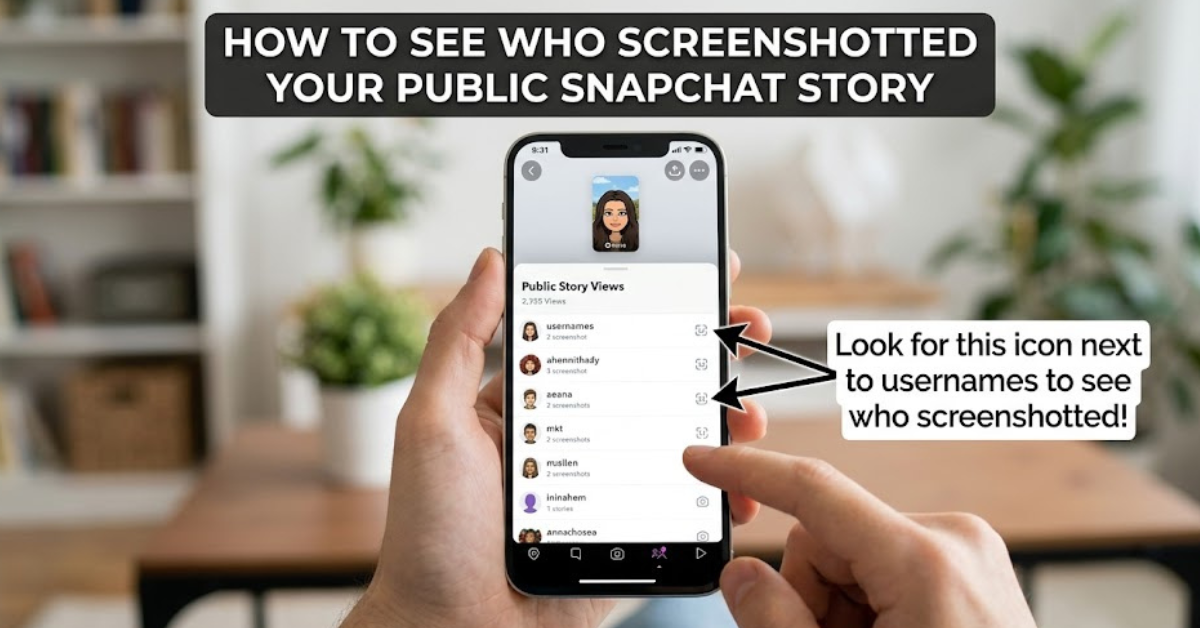

Have you ever posted a Snapchat Story and wondered whether someone took a screenshot of it? Whether you shared a funny moment, an important announcement, or a personal update, it’s natural to want to know who saved your content.
If you’re searching for how to see who screenshotted your public Snapchat story, the good news is that Snapchat does notify creators when someone screenshots their Story. In this guide, you’ll learn exactly where to find screenshot notifications, how they work on public Stories, what limitations exist, and how to manage your Snapchat privacy more effectively.
Understanding Snapchat Screenshot Notifications
Snapchat is known for its focus on temporary content and user privacy. Unlike many social media platforms, Snapchat often alerts users when someone takes a screenshot of their snaps, chats, or Stories.
For public Stories, Snapchat can display a screenshot indicator that lets you know when someone has captured your content.
However, there are some important details to understand:
- You can see the number of screenshots taken on your Story.
- You can usually identify the accounts that took the screenshot.
- The feature only works within Snapchat’s own notification system.
- If someone uses another device to photograph your screen, Snapchat generally cannot detect it.
Knowing these limitations helps you understand what information Snapchat can and cannot provide.
How to See Who Screenshotted Your Public Snapchat Story on Snapchat
Checking who screenshotted your public Story only takes a few moments. Follow these steps:
1. Open the Snapchat App
Launch Snapchat on your iPhone or Android device and log into your account if necessary.
2. Go to Your Profile
Tap your Bitmoji or profile icon in the top-left corner of the screen.
3. Find Your Public Story
Scroll to the My Stories or Public Profiles section, depending on how your account is set up.
Tap on the Story you want to review.
4. Check Story Insights and Viewers
Swipe up on the Story to access the viewer list and available analytics.
Look for the screenshot icon (usually a small symbol resembling overlapping arrows or a screenshot indicator). If someone captured your Story, Snapchat may display:
- The number of screenshots.
- The usernames of people who took screenshots (when available).
Can You See Who Screenshotted Your Snapchat Story After It Expires?
This depends on whether the Story and its analytics are still available in your Snapchat account.
Public Story insights may remain accessible for a period of time, allowing creators to review views, engagement, and other metrics. However, once Snapchat removes the data or the Story is no longer accessible, you may not be able to see who took a screenshot.
If you think someone screenshotted your Story, it’s best to check as soon as possible.
Why Can’t You See Who Screenshotted Your Public Snapchat Story?
Sometimes users notice a screenshot count but have trouble identifying the person behind it. This can happen for several reasons.
Privacy and App Limitations
Snapchat’s features can change over time, and certain analytics may differ depending on:
- Your account type.
- Your app version.
- Your device.
- Your region or available Snapchat features.
The Screenshot Was Taken Outside Snapchat’s Detection
Snapchat cannot detect every method of saving content. For example:
- Someone may use another phone or camera to take a picture of the screen.
- Certain third-party methods may avoid standard detection (though using unauthorized apps may violate Snapchat’s rules).
Can You Turn Off Screenshots on a Public Snapchat Story?
No, Snapchat does not currently offer a feature that completely prevents people from taking screenshots of your public Stories.
If you want more control over your content, consider these privacy options:
- Share Stories with Friends Only instead of the public.
- Adjust who can view your Story in Snapchat settings.
- Avoid posting sensitive personal information.
- Delete a Story if you no longer want it available.
Public content can reach a wider audience, so it is always smart to share thoughtfully.
How to Manage Privacy on Your Snapchat Public Profile
If you frequently post publicly, managing your settings can help you stay comfortable with your audience.
Change Story Privacy Settings
To adjust who can see your Stories:
- Open Snapchat.
- Tap your profile icon.
- Select Settings.
- Go to Privacy Controls.
- Tap View My Story.
- Choose your preferred audience.
Be Careful With Personal Content
Even with screenshot notifications, anything posted online can potentially be saved or shared. Consider keeping private conversations, personal details, and sensitive images limited to trusted friends.
Key Takeaways
- Snapchat can notify you when someone screenshots your public Story.
- You can check screenshot activity by opening your Story and viewing its insights or viewer information.
- Some screenshots may not be detectable, such as photos taken using another device.
- Snapchat does not allow users to block screenshots completely.
- Privacy settings can help control who sees your Stories.
Frequently Asked Questions
How do I know who screenshot my public Snapchat Story?
Open your public Story, swipe up to see Story insights, and look for the screenshot indicator. Depending on the available information, Snapchat may show the screenshot count and related account details.
Can I see who screenshotted my Snapchat Story after 24 hours?
You may be able to access certain Story analytics for a limited time, especially for public content. Once Snapchat removes the data, screenshot details may no longer be available.
Does Snapchat notify users when someone screenshots a public Story?
Yes, Snapchat generally provides screenshot notifications for Story creators when a screenshot is detected through the app.
Can someone screenshot my Snapchat Story without me knowing?
Yes, in some cases. For example, if a person uses another device to take a photo of the screen, Snapchat usually cannot detect it.
Does Snapchat show how many times someone screenshots your Story?
Snapchat can show the total number of screenshots on a Story. The exact details available may vary based on your account and the app’s current features.
Are third-party apps reliable for seeing Snapchat screenshots?
No. Apps claiming to reveal hidden screenshot information are often unreliable and may put your account privacy or security at risk.
Conclusion
Understanding how to see who screenshotted your public Snapchat story helps you stay informed about how your content is being viewed and saved. By checking your Story insights, paying attention to screenshot indicators, and using Snapchat’s privacy settings, you can make smarter decisions about what you share publicly.
While Snapchat offers useful transparency, no platform can completely prevent people from saving online content. The best approach is to combine Snapchat’s tools with mindful sharing habits to protect your privacy and enjoy the platform more confidently.