
Few office frustrations are as annoying as feeding a stack of documents into a shredder only to hear the machine struggle, stop, or flash a warning light. A paper jam can interrupt your work and leave you wondering whether the shredder is broken for good.
The good news is that learning how to unjam a paper shredder is usually straightforward. In most cases, a jam happens because of too much paper, dull blades, or improper maintenance. With the right approach, you can safely remove stuck paper, restore performance, and keep your shredder running smoothly.
In this guide, you’ll discover the common causes of jams, detailed steps to fix them, safety precautions, and simple maintenance habits to avoid future problems.
Why Do Paper Shredders Get Jammed?
Understanding why a shredder jams can help you prevent the issue from happening again. Most paper shredders, whether from brands like Fellowes, Amazon Basics, Aurora, or Bonsaii, experience jams for similar reasons.
Common causes include:
- Feeding more sheets than the shredder’s recommended capacity
- Inserting thick materials such as cardboard or laminated paper
- Allowing shredded paper to build up in the waste bin
- Running the machine continuously beyond its duty cycle
- Lack of lubrication causing blades to become less efficient
- Trying to shred items like plastic, staples, or paper clips in machines not designed for them
A jam does not always mean your shredder is damaged. Often, a simple cleanup can solve the problem.
How to Unjam a Paper Shredder Safely
The first rule when fixing a jammed shredder is safety. The blades inside are sharp and the motor can unexpectedly activate if the machine is plugged in.
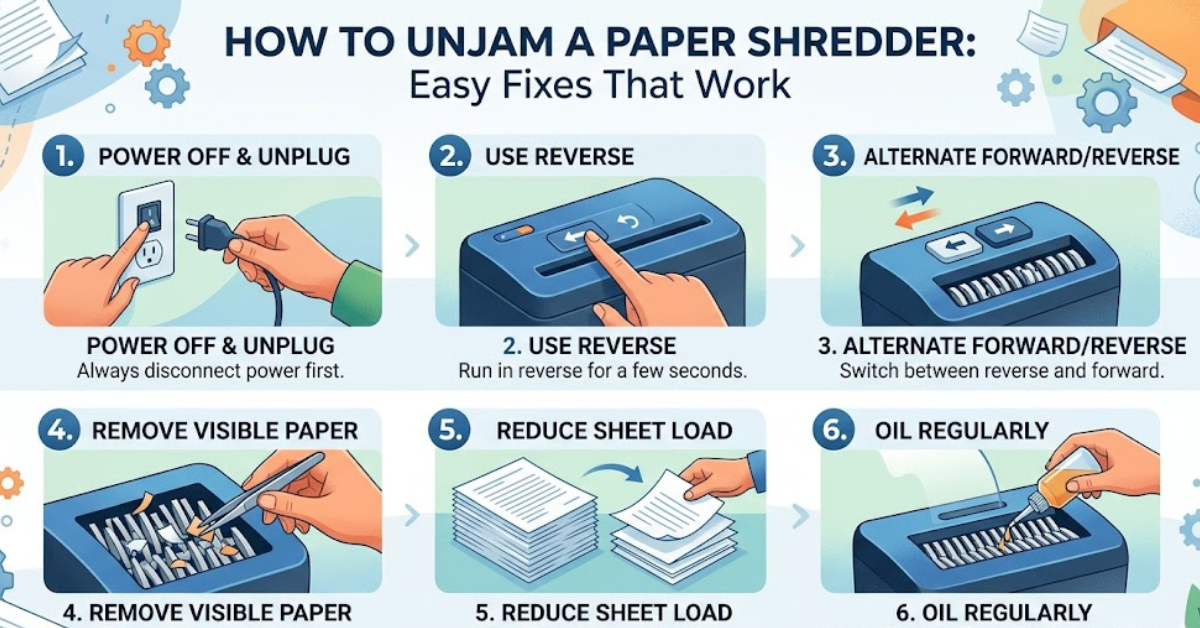
Step 1: Turn Off and Unplug the Shredder
Switch the shredder off and disconnect it from the electrical outlet. Wait a few minutes for the motor to cool down if it feels hot or has entered a thermal protection mode.
Never place your fingers near the cutting blades while the machine is connected to power.
Step 2: Empty the Waste Bin
Sometimes the problem is simply an overfilled bin that prevents shredded paper from moving away from the blades.
Remove the shredder head, empty the container, and check for compacted paper around the cutting area.
Step 3: Use the Reverse Function
Most modern shredders have a reverse setting designed specifically to clear minor jams.
To use it:
- Plug the machine back in.
- Switch it to reverse mode for a few seconds.
- Pull out loosened paper gently.
- Turn the machine off and unplug it again before further cleaning.