
Have you ever checked your call log and noticed the term “outgoing call” next to a phone number? Whether you’re reviewing your phone records, monitoring business calls, or simply trying to understand your smartphone better, this common term can sometimes cause confusion.
So, what does outgoing call mean exactly?
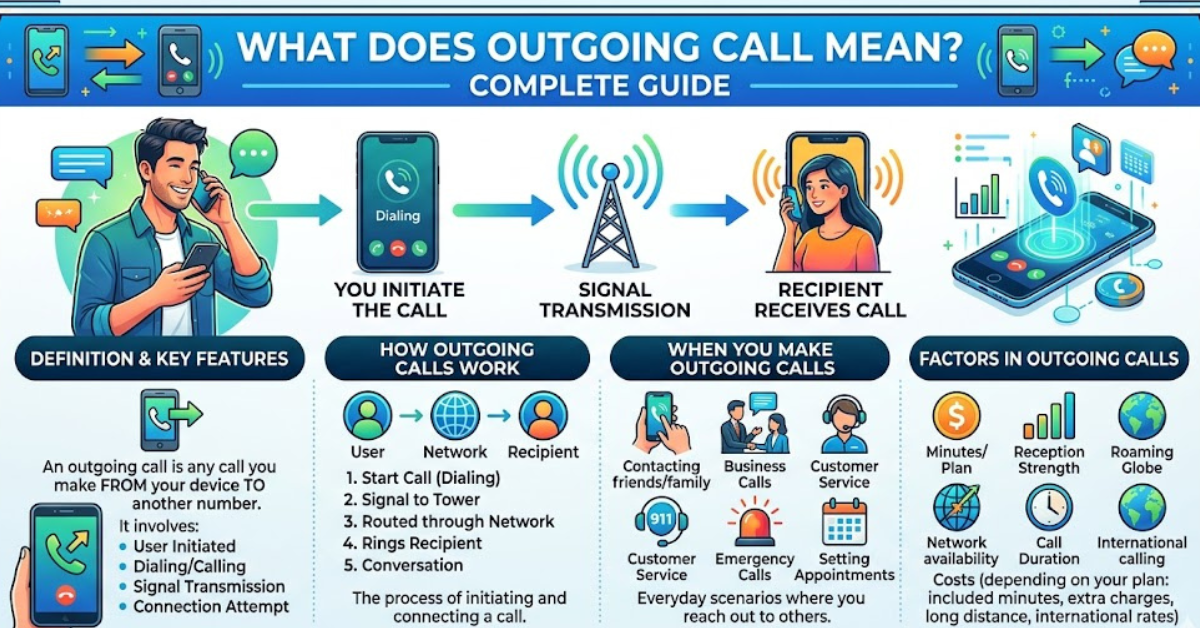
In simple terms, an outgoing call is a phone call that you initiate from your device to another person or business. It indicates that you were the caller rather than the receiver. Understanding outgoing calls can help you manage call history, troubleshoot communication issues, and interpret phone records more accurately.
In this guide, you’ll learn how outgoing calls work, how they differ from incoming and missed calls, what they look like in call logs, and why they matter in everyday communication.
Understanding the Meaning of an Outgoing Call
An outgoing call refers to any telephone call that originates from your device and is directed to another phone number.
When you dial a number and press the call button, your phone sends a request through your mobile carrier or internet calling service. Once the connection is established, the call is recorded as an outgoing call in your call history.
Simple Example
Imagine you call a restaurant to make a reservation.
- You dial the number.
- The call connects.
- The call appears in your history as an outgoing call.
Since you initiated the communication, the system classifies it as outgoing.
How Outgoing Calls Work
The process behind an outgoing call is straightforward but involves several technical steps.
Step 1: Dialing a Number
You enter a phone number manually or select a contact from your phonebook.
Step 2: Call Request Is Sent
Your phone sends a call request through:
- Mobile carrier networks
- VoIP services (Voice over Internet Protocol)
- Business phone systems
- Internet calling apps
Step 3: Network Routes the Call
The network identifies the destination number and routes the call appropriately.
Step 4: Connection Is Established
If the recipient answers, the call becomes active.
Step 5: Call Is Logged
The call is recorded in your call history as an outgoing call, often including:
- Phone number
- Date
- Time
- Call duration
- Call status
Outgoing Calls vs Incoming Calls
Many people confuse outgoing and incoming calls. The distinction is simple.
| Call Type | Definition |
| Outgoing Call | You initiate the call |
| Incoming Call | Someone else calls you |
| Missed Call | An incoming call that was not answered |
Example
Suppose you call your friend Sarah.
- On your phone: Outgoing call
- On Sarah’s phone: Incoming call
The same conversation is categorized differently depending on who initiated it.
What Does an Outgoing Call Look Like in Call Logs?
Most smartphones display outgoing calls with a specific icon or label.
Android Devices
Android phones often use:
- A phone icon with an arrow pointing outward
- The label “Outgoing”
- Green call indicators on some devices
iPhone Devices
iPhones typically show:
- A phone icon
- Call duration
- Time and date information
The exact appearance depends on the iOS version and carrier settings.
Information Usually Displayed
Call logs may include:
- Contact name
- Phone number
- Call date
- Call time
- Call duration
- Call outcome
This information helps users track communication history effectively.
Why Outgoing Calls Matter
Outgoing calls serve several practical purposes beyond simple communication.
Personal Record Keeping
People often review outgoing calls to:
- Remember previous conversations
- Confirm contact attempts
- Check call duration
- Track important communications
Business Communication
Businesses rely heavily on outgoing call records for:
- Customer service monitoring
- Sales tracking
- Employee performance analysis
- Call center management
Billing and Usage Monitoring
Some mobile plans still track:
- Number of outgoing calls
- Call duration
- International call usage
- Roaming charges
Reviewing outgoing calls can help identify unexpected costs.
Can an Outgoing Calls Show If Someone Answered?
Not always.
A call may appear as outgoing even if:
- The recipient did not answer
- The line was busy
- The call went to voicemail
- The call was declined
How to Tell
The best indicator is often the call duration.
Answered Call
- Shows measurable duration
- Example: 5 minutes 24 seconds
Unanswered Call
- Duration may show 0 seconds
- May display “No Answer” on some devices
Carrier records and business phone systems may provide more detailed statuses.
Outgoing Calls on Different Platforms
Today’s communication extends beyond traditional mobile networks.
Cellular Calls
Standard calls made through your mobile carrier.
Examples:
- Verizon
- AT&T
- T-Mobile
- Vodafone
VoIP Calls
Voice over Internet Protocol calls travel through the internet.
Examples:
- Skype
- Zoom Phone
- RingCentral
- Microsoft Teams
Messaging Apps
Many apps support voice calling features.
Examples:
- Telegram
- Signal
- Facebook Messenger
Calls placed through these services are still considered outgoing calls because you initiated them.
Common Reasons People Check Outgoing Calls
People search their outgoing call history for many reasons.
Verifying Contact Attempts
You may want proof that you called someone.
Reviewing Communication History
Call logs help recall:
- Dates
- Times
- Frequency of communication
Monitoring Phone Activity
Parents, businesses, and individuals often review outgoing call records for accountability and oversight.
Troubleshooting Problems
Call logs can reveal:
- Failed call attempts
- Network issues
- Incorrectly dialed numbers
Why Does My Phone Show an Outgoing Calls I Don’t Recognize?
An unfamiliar outgoing call can be concerning.
Several explanations may exist.
Accidental Dialing
A contact may have been called unintentionally.
Pocket Dialing
Phones sometimes place calls while stored in a pocket or bag.
Device Syncing
Connected devices may trigger calls through shared accounts.
Unauthorized Access
In rare cases, someone else may have accessed your phone.
If you notice suspicious outgoing calls:
- Review recent activity.
- Change account passwords.
- Enable device security features.
- Contact your carrier if necessary.
Are Outgoing Calls Recorded Automatically?
The call itself is usually not recorded automatically.
However, most devices and carriers record call details such as:
- Number dialed
- Date
- Time
- Duration
Actual audio recordings typically require:
- User permission
- Call recording software
- Business phone system settings
Laws regarding call recording vary by region, so always follow local regulations.
How to Check Outgoing Calls on Your Phone
On iPhone
- Open the Phone app.
- Tap Recents.
- Review call history.
- Locate outgoing call entries.
On Android
- Open the Phone app.
- Select Recent Calls or Call History.
- Identify calls marked as outgoing.
Most devices allow filtering by call type for easier navigation.
Key Takeaways
- An outgoing call is a call that you initiate from your phone or calling app.
- Outgoing calls differ from incoming calls because you start the communication.
- Call logs record details such as time, date, number, and duration.
- Outgoing calls can occur through mobile networks, VoIP services, and messaging apps.
- A call can still be classified as outgoing even if the recipient does not answer.
- Reviewing outgoing calls helps with communication tracking, billing, and troubleshooting.
Frequently Asked Questions
What does outgoing call mean on a phone bill?
An outgoing calls on a phone bill indicates a call that originated from your phone number. The bill may also show the date, duration, and destination number.
Does an outgoing call mean the person answered?
No. An outgoing calls simply means you initiated the calls. The recipient may have answered, declined, or missed it.
What is the difference between outgoing and incoming calls?
Outgoing calls are initiated by you, while incoming calls are initiated by someone contacting you.
Why do I see outgoing calls that I didn’t make?
Possible causes include accidental dialing, synced devices, or unauthorized phone access. Review your account activity if the calls seem suspicious.
Are WhatsApp calls considered outgoing calls?
Yes. When you place a voice or video call through WhatsApp, it is considered an outgoing call because you initiated the communication.
Can I delete outgoing calls from my calls history?
Yes. Most smartphones allow users to delete individual call entries or clear the entire call history through the Phone app.
Conclusion
Understanding what does outgoing call mean is important for interpreting phone records, managing communication history, and troubleshooting call-related issues. Simply put, an outgoing call is any call that you initiate from your device, regardless of whether the recipient answers.
Whether you’re reviewing personal call logs, checking mobile bills, or managing business communications, recognizing the role of outgoing calls can help you stay informed and organized. Take a few moments to explore your call history—you may gain valuable insights into your communication habits and phone usage.